This blog contains reflections and thoughts on my work as a software engineer

tirsdag den 23. juni 2009

Followup…

I have figured out a workaround to the problem regarding CruiseControl.NET having to run in Console-mode… There obviously wasn’t any elegant way to handle this so I decided to at least try and hide the console window outputting CruiseControl debugging info. so you can hide a console window and keep the process running. Instead of firing up CruiseControl.NET directly I created a small consoleapp which fires up CruiseControl.NET in console mode and then uses Windows API to hide the console window from the screen and was pretty amazed that I pulled it off within an hour. So I ended up with this - all credits to Brendan Grant:

class Program

{
[DllImport("user32.dll")]
public static extern IntPtr FindWindow(string lpClassName, string lpWindowName);

[DllImport("user32.dll")]
static extern bool ShowWindow(IntPtr hWnd, int nCmdShow);


static void Main(string[] args)
{
var fi = new FileInfo(string.Format("{0}/CruiseControl.NET/server/ccnet.exe", Environment.GetEnvironmentVariable("PROGRAMFILES")));
if (!File.Exists(fi.FullName))
{
Console.WriteLine("ccnet.exe not found in " + fi.FullName);
Console.Read();
Environment.Exit(0);
}

var p = new Process {StartInfo = new ProcessStartInfo(fi.FullName)};
p.StartInfo.WorkingDirectory = fi.DirectoryName;
p.Start();
Thread.Sleep(3000);

SetConsoleWindowVisibility(false, fi.FullName);
}

public static void SetConsoleWindowVisibility(bool visible, string title)
{
// below is Brandon's code
//Sometimes System.Windows.Forms.Application.ExecutablePath works for the caption depending on the system you are running under.
var hWnd = FindWindow(null, title);

if (hWnd != IntPtr.Zero)
{
if (!visible)
//Hide the window
ShowWindow(hWnd, 0); // 0 = SW_HIDE
else
//Show window again
ShowWindow(hWnd, 1); //1 = SW_SHOWNORMA
}
}
}


Now I’m exactly where I was a few days ago except I don’t have a console window on my server… I still have to remember not to log off when remoting to my buildserver and if something crashes I haven’t got any context running CruiseControl which writes stuff into the Eventlog etc. At best this is – well, pretty bad coding style actually... but again: It’ll do for now  :o)

fredag den 19. juni 2009

Testing Javascript in a Continuous Integration environment

Ever since I started doing TDD I've been looking around to find a solution for testing UI and Javascript which would enable me to develop UI having unittest-style feedback and integrate my UI testing in a Continuous Integration setup. A few months ago we tried using QUnit at work for testing clientside scripts which relies on 3rd party vendors (Google Maps) to provide us with data for our application. I always wanted to find time to try and mainstream our experiences a bit because we never got much past "let's-try-this-thing-out" and spend a few hours seeing what could and could not be accomplished.

So - I decided a few days ago to sit down and spend a few evenings setting up a Continuous Integration environment which would

  • A) Run clientside tests in a Continuous Integration server
  • B) Provide TDD-stylish feedback on both NUnittests and clientside tests

Disclaimer: If you don't have experience with Continuous Integration environments you might find this to go a bit over your head - I strongly recommend this article written my Martin Fowler and if you really want to dig deep into the subject "Continuous Integration - Improving Software Quality and Reducing Risk" is a must-read.

How it was done

I decided to use QUnit due to the fact that it is the clientside scripting library used to test JQuery. If it good enough for those people I guess it's as good as it gets - I didn't want to even try and dig up some arbitrary, halfbaked library when QUnit was such an obvious choice. I won't go into details about the "what" and "how" of QUnit - what it does is that it provides you with feedback on a webpage which exercises your tests written in Javascript - like this: 
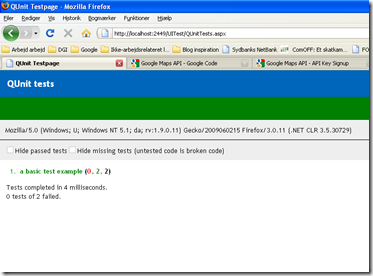
image image

So - you write a test in a script and execute it in a browser and get a list of failing and completed tests. If everything is OK the top banner is green (left). If one or more tests fail the banner is red (right). This is controlled by CSS-class called "pass" and "fail". With that in mind and with a little knowledge of Watin I decided to just use write a unittest in Watin because it would allow me to write an test resembling the following:

[Test]       
public void ExerciseQUnitTests()
{
    using (var ie = new IE("http://(website)/UITest/QUnitTests.aspx"))
    {
        Assert.AreEqual("pass", ie.Element("banner").ClassName, "QUnittest(s) have failed");
    }
}


...where QUnitTests.aspx should be the page exercising my QUnit tests. The test itself should check for a specific class in the top banner - if "fail" would be active one or more tests would have failed and the unittest should fail and cause a red build. There is at least one obvious gotcha to this approach: You only get to know that one or more clientside-tests have failed. You don't get to know which one and why it failed. Not very TDD'yish but it'll do for now.


Here's a list of the things I needed to do once I had my Watin-test written:


  • I created a new project on my private CruiseControl.NET server which would download the sourcecode from my VS project, compile it using MSBuild and execute the unittests in my testproject. I battled for an hour or so with Watin because it needs to have ApartementState explicitly set. You won't have any problem when running your test in Visual Studio only but whenever you try to run the Watin test outside Visual Studio you get - well, funny errors basicly.


  • I pointed the the website to the build output folder in Internet Information Server


  • Then I ran into another problem - QUnit appearenly didn't seem to work very well with Internet Explorer 7 (or so I thought) - the website simply didn't output any testresults on my build server. It wasn't a 404 error or so - the page was just plain blank - so I had working tests on my laptop and failing tests on my buildserver. Without thinking much about it I upgraded to Internet Explorer 8 on my buildserver. Not much of deal so I did it - just to find out that the webpage still didn't output any results in IE 8 either. After a while of "What the f*** is going on" I started thinking again and vaguely remembered a similar problem I had about halft a year ago... The problem back then was that scripting in IE7 is disabled per default on Windows 2008 - which of course was the problem here as well. So I enabled scripting and finally got my ExerciseQUnitTests test to pass. Guess what happened when I forced a rebuild: GREEN LIGHTS EVERYWHERE. Yeeeehaaaaaaaa  :o)


  • Last, but not least I found out that CruiseControl.NET from now on will have to run in Console-mode in order to interact with the desktop in a timely fashion - because it needs to fire up a web browser - oh dear... I need to look into that one because I define having console apps running in a server environment as heavy technical debt you need to work your way around somehow. But again: It'll do for now even though I find it a little akward.


Conclusion: After a good nights work I got the A part solved - and another two nights I cranked the B part open as well. I'm now able to write QUnittests testing code in my custom JavaScript files, exercise the tests locally in a browser, check everything in and let a buildserver exercise the tests for me just like my client-code tests were first class citizens in TDD. Sweeeeeet....  The sourcecode is available for download here  - please provide feedback to this solution and share experiences on the subject with me in the comments   :o)


Links:


Continuous Integration article by Martin Fowler


QUnit - unit testrunner for the jQuery project


CruiseControl.NET - an opensource Continuous Integration server for Windows


Watin - web test automating tool for .NET

torsdag den 11. juni 2009

Testing software quality – open your mind

I recently attended a two day course called “Softwaretest – when it’s best” in Copenhagen. The reason I found it worth going to was that we recently had a major breakdown in our production environment because we pushed a bugfix into production without having properly testing what we were actually releasing. Thus having a new refactored decoupling of of our AspNetEmail component released without it being properly tested… You can imagine what people think of the guys in the IT departement when they either don’t get their mails or get them multiple times at random… Luckily we didn’t send anybody an email that they shouldn’t have recieved but we sustained major damage to our reputation within the organization because it’s not the first time we committed crimes like these before. So – we definately need improvement in our testing phase. We’re a team of developers – 5, to be exact. We know our TDD-drill and Continuous Integration is a first class citizen in our office so testing our own software isn’t totally unknown to us. I just feel we need to fill in the gaps to get to the next level - ideally without having to build and maintain an extensive and bureaucratic testing process nobody buys into 110 percent.

So I went there with a collegue to learn about this testing stuff - and I feel I am a little wiser now. Here's the eye-openers I have decided to share with you:

  • Developers live and breathe to make things work. Testers live and breathe to make things break. It’s a state of mind you need to be aware of as a developer. You can’t sit down and develop – and then test your doings without having said to yourself “I’m not a developer right now – I’m now a tester and want to break stuff”. I tried it today and WHAM!!! I found 3 critical bugs in a piece of software I recently wrote on one of my hobby projects. Each of them could have been found if I sat down and reviewed the code - but I found them nevertheless by simply WANTING to find errors.
  • Evolution is better than revolution. Nobody likes to be hazzled into something if they don't believe it provides value. Don't start out with preaching about "the god-awesome Testing Maturity Model (TMM)" and your visions about reaching level 5 before the end of the year. Get everybody involved before making any decisions - something about people and interactions over processes and tools... You know the drill for sure but it's easy to forget.
  • If you don't understand the product you won't find the error! How often have you reviewed code and signed off on it just to find out a month later that it had bugs in it - functional as well as nonfunctional? I have more times than I actually would like to think of... If you don't know what the code is supposed to do - you can only verify what it actually does. You'll never get to the point where you realize what's missing in the code if you don't know what the customer expects from it.
  • Test the deliverables not the specifications! If you have a clear set of specifications and a testplan for those you should of course use that testplan. But - your focus must always be on what is being delivered. You should as a tester try to gain as much understanding of the domain you're testing as possible - because who knows if the testplan (if one exists) is adequate? If you during development find out that performance is critical for a specific part of the software it is your responsibility to take this into account when testing even if performance is not an issue in the specifications. If the customer percieves the software as buggy it IS buggy regardless of whatever tests you've completed and signed during development and accepttesting.
  • ...plus a number of other related goodies such as "How to write a test plan", equivalence numbers, conflict handling between testers and developers, the difference between Blackbox and Whitebox testing etc.

The very vital issue while testing is that testers have a different mindset. Their best days at work is when they find themselves "in the zone" registering bugs like maniacs while developers think success and failure in terms of solving problems and implementing features. If you’re a developer you will never become much better than poor (at best) in a testing phase if you don't acknowledge that you need to change some things in your head in order to improve your testing capabilities. That's probably the biggest eyeopener I've had since I wrote my first unittests and after an hour or two of "Why am I writing so much code for nothing" suddenly got a failing test totally unexpected...

Tomorrow, before you contact your Product Owner because you have released something to your staging environment - say to yourself: “The next hour I'm a success ONLY if I can find bugs in what I just released”. Sit down, seek - and you will find. Promise :o)

torsdag den 14. maj 2009

Release planning with only one SCRUM team servicing multiple Product Owners

In real life, SCRUM usually requires some adjustments to fit into the organization in which you are working. One of the issues I have come across in my daily work as a ScrumMaster is having to work for multiple ProductOwners but the only ressource available is a single team. SCRUM applied with the green band around your arm says that a ProductOwner has a dedicated team throughout the entire project. In real life – that’s hardly ever so. I tried both ways – working on a dedicated team with a single PO and at my current job we are serving no less than seven ProductOwners with a single team of 4 developers – and everybody is generally happy about it. How is that possible?

We have decided on a model in which we do SCRUM by the book. Whenever we break away from the beaten path we do it because it enhances transparency and maintains visibility in contradition to following the “rules” of SCRUM. We try to do things because they make sense to us – individuals and interactions over processes and tools, we say. Having seven ProductOwners aren’t exactly SCRUM by the book but nevertheless it is the world we live in and things aren’t going to change on that particular issue. How to apply SCRUM under these conditions?

What we’ve tried to accomplish now is a more thorough plannning process – we’ve introduced release planning in our process. We have introduced what we call Pre-sprint planning. It is a meeting held about the 10. in every month. Participants are ScrumMaster (me), our IT Manager and a role we’ve invented called ProductOwner Coordinator. The IT manager is in charge and decides which backlogs gets a time slot in the forthcoming sprints. Every ProductOwner writes the IT manager an Email prior to our Pre-Sprint plannings and argue his or her case for having time in the forthcoming sprints. Some backlogs get time and some don’t. The very important thing here is that there is only one single person who decides – call it dictatorship but it’s the easiest for all parties involved.

At the meeting we collect the necessary data needed to prioritize. These data inclue all requests from ProductOwner, the content of our Team Backlog (the team’s list of technical debt issues prioritized by business value and estimated just like a normal backlog) and the contents of all Must-Haves on every backlog aggregated into a single Excel spreadsheet. We base our discussion on the data before us and the IT manager decides on a release plan for the next 3-4 months.

An example: Backlog A gets perhaps 50% of the next sprint. Backlog B and C gets 25% each in the next sprint. Backlog D gets 100% in the sprint after the next one. This release plan of course isn’t carved in stone – nothing is until Sprint Planning 1 where the team commits to a list of stories for the upcoming sprint. The release plan is being published on a blog which every ProductOwner subscribes to – and if a ProductOwner disagrees with our IT managers decisions after reading the updated releaseplan because he thinks there is more business value in getting his backlog stories implemented - he is required to go to our IT manager and argue his case and make a new request. A month later we meet again to another round of Pre-sprint planning and the current release plan is discussed, requests are taken into consideration and an updated releaseplan is published on our blog.

The advantages by having a long-term goal are numerous:

  • Visibilty is evident. The entire business knows what’s going on and who get’s precious timeslots next.
  • The team knows in advance which backlogs to estimate stories from. No more estimation meetings on backlogs which never make it to Sprint Planning.
  • Our many ProductOwners have a single person to go to in order to get stories implemented by the team.

The main advantage is that it is clear to everybody who’s in charge. This person must be empowered to prioritize between multiple requests and wishes. This person must not be an active participant in the process of implementing stories – no ProductOwner, ScrumMaster or Team member should attend this role. Our IT manager is the right choice in our organization. It depends heavily on the culture and organization structure which person is the right for this job.

We’ve tried this approach for the first time at our last Pre-sprint planning because we needed to get a clear picture of which backlogs we could focus on during the summer because our vacations are very wide spread this year. If nobody disagrees with it - well – we call in for estimation meetings on the backlogs we know are in the pipeline and will be much better prepared for Sprint Planning 1 than we’ve ever been even with the limited ressources available to us during vacation season    :o)

onsdag den 13. maj 2009

Excel can’t count?

I’m currently working on a data-extraction gig – basicly we have 4 different data providers to persist information about attendees to a summit in July with some 25.000 participants – and I’m currently in the process of creating a small, shortlived console app which generates an Excel-file with information about each participants so we are able to print out identitcal badges used to identify participants at the gates during the summit.

I encountered one of the scariest things I’ve seen in months while working today on the application. First things first: One of the datastores for participants is an Excel spreadsheet – one line per guest that is. Easy enough, I found some code using the OleDB Jet-engine:

string connectionString = string.Format("Provider=Microsoft.Jet.OLEDB.4.0;Data Source={0};Extended Properties=\"Excel 8.0;HDR=YES;\"", _xlsFile);
DbProviderFactory factory = DbProviderFactories.GetFactory("System.Data.OleDb");
using (DbConnection connection = factory.CreateConnection())
{
connection.ConnectionString = connectionString;

using (DbCommand command = connection.CreateCommand())
{
command.CommandText = "SELECT * FROM [Ark1$]";
connection.Open();

using (DbDataReader dr = command.ExecuteReader())
{
while (dr.Read())
{

//do stuff

}
}
}
}


During an ongoing testphase (yes, we actually DO this agile stuff here) I noticed that one of the columns in my output spreadsheed didn’t match the expected values. Quite an error actually because one of the things people at the summit do care a lot about is that the food they’d paid deerly for in advance ends up as a crossed checkbox in the right place on their ID-card. Otherwise they will not be allowed access to the dining area… You can imagine what people think of the IT-guy in charge if things like this doesn’t work like a charm.


So I started debugging. First I suspected that I simply counted wrong when extracting values – namely the output from these columns


image 


As far as I’m concerned M is the 12. letter and N is the 13. However – debugging this stuff showed me the following output for the first and second row:


image


and row #2:


image 


The birth date matches (as with names and other stuff) but notice the the 13. and 14. column which doesn’t match at all with the data in the spreadsheet… For one every cell has a value so how can row #2 suddenly be empty in the debugger???


I suspected I was working on another file than the one I thought – triplechecking that by inserting my own name and seeing it come up in the debugger proved that theory wrong.


I’ll personally buy the first person to explain this mystery a beer for an bulletproof explanation (other than my own which of course includes a major malfunction in Excel 2003 / .NET / OleDB / pick your own). What’s going on here? I’m not even close to being overworked (don’t tell my boss) and the code is simple… I tried converting the source spreadsheet to CSV to check the values in a plain textfile and they are what they should be according to the source spreadsheet so that’s the approach I’m taking now. Instead of parsing the Excel directly I’m converting it to CSV and using that as my datasource instead. Not very elegant but it makes me feel a lot safer.

tirsdag den 10. marts 2009

Why developers love a big whiteboard

If you ever wondered why developer's love for whiteboards is so passionate you get the answer here:

http://www.agile-software-development.com/2009/03/power-of-whiteboard.html

I like the last comment best:

"Tools can certainly help to organise information more efficiently. But I would challenge any tool to do all of that! I'm not against tools. Not at all. But I think they should supplement the whiteboard, not replace it. Tools should be used for things they can do that a whiteboard can't. For instance, keeping track of longer lasting information, doing calculations, searching, etc."

Question, just out of curiouosity - it might even be a little stupid but here goes: Did you ever work somewhere (as a developer) where whiteboards were regarded as You Ain't Gonna Need It ??

Regards K.

mandag den 2. marts 2009

Code reviews done "right"

This is the second post in a series of posts related to 10 things I don't believe in.

"I don't believe in code conventions" - hmm... Did I really write that? How can reviewing code be bad? It's not, actually. Code reviews can be beneficial if they are done right because to have someone review code you have written is one of the top 3 things you can do as a software developer to improve your skills. It's just the way things work - you can be a winner in life, in love and in any Xbox game by not repeating your mistakes more than once - and you will be a pitiful looser with no friends and no money if you have one success and spend the rest of your life doing whatever made you a success in the past over and over again.

When I think "code review" I think:

  • Get a timeslot in everyone's calendar and book a meeting for i.e. half an hour or an hour
  • Once at the meeting: Get everyone lined up in front of a projector
  • Pick some code from the project you're working on
  • Have the person who wrote it to walk you through
  • Feedback

95% of all the formal code reviews I have ever attended followed that prescription - and it never really worked out the way it was intended for the following reasons:

  • Get a timeslot in everyone's calendar and book a meeting for i.e. half an hour or an hour
    • Developers hate meetings. It takes time from their coding, quite literally. Developers don't like to be interrupted unless they feel an urgency to attend the meeting - and code reviews aren't percieved as something you'll die of if you don't get your weekly dosis.
  • Get everyony lined up in front of a projector
    • The more formal the approach, the merrier. There might even be some sort of agenda: "Class X: 10.00 A.M, Class Y and Z, 10.20 A.M. T-SQL changes 10.40 to 11.00 A.M"... Let's see some code, right?
  • Pick some code from the code you're working on
    • Is everyone working on the same project? If yes that's fine - proceed. If no, you'll lose every single developer who hasn't been actively committing to the code you've picked. People just don't feel committed to concentrate on understanding Javascript if they regard themselves as being primarily Database guys. And the clientside guys and gals don't have much input to a discussion about classes not implementing IDisposable in a correct manner.
  • Have the person who wrote it walk you through
    • Being up on the stage in the spotlight takes some balls to everyone who isn't used to being looked at - you're in a very vulnerable position up there. Also having to communicate some crappy code you wrote in front of perhaps some senior developers who you know have at least a dozen better ways to implement a variation of the combined Visitor / Strategy pattern you've been working on can be frightening.
  • Feedback
    • If basic trust and respect between the parties attending the code review aren't there code reviews can actually do more damage to team morale than anything else because creative people (like developers) tend to block their minds when being critizied because they put so much of themselves into their work. Even if a developer has got the arguments to prove his way of doing things he might not be able to communicate well because of the spotlight and the crowd of people staring at him.
    • If feedback to code reviews aren't backed by i.e. code conventions or architectual documentations in terms of "this is how we do things here when we deal with datetime formatting" they will mostly be based on personal bias towards a solution you like better - not necessarily the right solution for the problem at hand. That's the way it works in real life if there are no code quality measures beyond the team that the code should live up to.

Only very mature teams can handle a code review which includes a projector, I think. And why, why, why make things so complicated? Why call everyone in and disturb everyone because "code reviews are important"? When I want my code reviewed I do this:

  • Write some code
  • Ask anyone of my collegues to look it through
    • He or she moves to my desk and we sit down together and go through things together
    • We might refactor while pairprogramming
  • Put my taskcard on the "To be verified" column on our sprint board

This informal approach has a number of advantages: It doesn't feel like a code review. You don't get to attend meetings which you feel eats away your coding-time. Nobody is put up on a stage and asked to speak loud and clear because there are 6 people sweating and a projector humming in the background. Feedback happens informally and instant - and you feel safer walking through the code because it is fresh in your mind (you just wrote it, remember?). Feedback is also more valuable because it happens 1-1 in an atmosphere of "how do I solve this problem the right way". You're in problem-solving mode while sitting at your desk - chances are that you're not if you're being interrupted on-stage while trying to remember why class X implements interface Foo instead of the more general interface Bar.

Martin Fowler once wrote that If it hurts do it more often. If code reviews don't feel right you're doing it wrong - and probably you should begin by loosen up the tie and try a less formal approach because informal approaches always works the best while dealing with developers.

Until next time...

Regards K.